TallyFlex: ABA data collection2.32.1
Publisher Description



Collect behavior and skill data, review progress, and prepare reports in one app.
TallyFlex brings behavior and skill data, progress graphs, session notes, and reports together for BCBAs, RBTs, special education teachers, and other professionals.
Collect during the session
Track behavior and skills with frequency, duration, latency, percent correct, interval recording, and momentary time sampling. Record ABC data, break skills into task-analysis steps, and document prompt levels.
Review session details
Review a session’s collected data, graph, recorded events, and saved notes in one service record. Expand the event timeline to follow the sequence of recorded events.
Follow progress over time
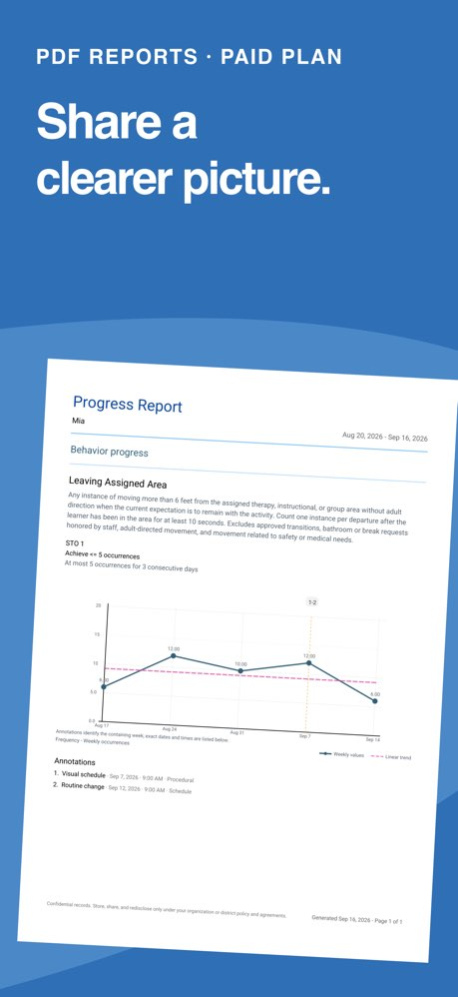
Review progress graphs and add annotations for changes such as staffing or schedule updates. Organize programs into phases and targets to keep the skills you are working on connected.
Bring clear reports to your next review
Create PDF reports with graphs and summaries. Review session notes in a Notes Only report, or combine a day's service records, data summaries, timeline events, and notes in a Daily report. Export raw data to CSV or Excel.
The Free plan includes core data collection, session notes, and basic CSV and Excel export. Programs, task analysis, prompt levels, full session timelines, and PDF reports require a paid subscription. Solo is a subscription for individual use, available through in-app purchase.
Start collecting with TallyFlex.
Questions? support@tallyflex.com
Terms of Use: https://www.apple.com/legal/internet-services/itunes/dev/stdeula/
Version History Better notes. Clearer progress. Less busywork.
TallyFlex 2.32 brings Enhanced Notes, a refreshed program workspace, and new ways to review and share your work.
INTRODUCING ENHANCED NOTES
Give your notes more structure with text formatting, reusable templates, and guided forms. Start with a built-in template or create your own, and keep Quick Notes and session data within reach while you write.
EASIER PROGRAM AND TARGET SETUP
Explore programs, phases, targets, and objectives in a clearer workspace. Review mastery criteria alongside supporting graphs and find the details you need with less digging.
DAILY POINTS, READY TO SHARE
Open a whole-day view of ratings and scores from Analysis, update ratings, and export a printable daily summary.
CLEARER REPORTS
Enjoy simpler Client Summary exports, easier-to-read program and target reference PDFs, improved note formatting, and fixes for report exports and long text in spreadsheets.
BETTER SUPPORT FOR OFFLINE SESSIONS
We’ve improved offline recording, shared-session updates, and reconnecting, with clearer messages when changes still need to sync.
A SMOOTHER EVERYDAY EXPERIENCE
Find your preferences faster in reorganized Settings, see clearer save status when entering data manually, and keep Quick Note drafts through iPad rotation.
Thank you for helping us make TallyFlex better, one session at a time.
Some features require a paid subscription. 2.32.1 23h ago New in this update:
• Export progress reports for multiple students at once, with a separate PDF for each student.
• Track up to 12 student sessions at the same time.
• Clearer target setup, mastery review and report options.
Plus bug fixes for a smoother experience. 2.30.1 Oct 3 This update makes programs and targets easier to set up and manage:
• Add Task Analysis targets and steps while creating a program.
• Find and organize targets with simpler filters and smoother reordering.
• See clearer mastery progress and what’s needed to move to the next phase.
Plus smaller usability improvements and bug fixes throughout the app. 2.29.0 Sep 25 A smoother, more reliable experience helps you stay focused on the people you support. 2.28.1 Sep 20 Catch up on visit records, choose what your reports show, and add context right where you need it.
- Record past visits: Add observations to a past appointment or link observations you've already entered. If a visit happened without measurements, you can mark it completed without adding data.
- Reports with the right detail: Choose whether Session and Daily PDF summary tables include supporting measurement details, while keeping the results. Session report tables are also easier to read.
- Annotations within reach: Add an annotation directly from a client or student's menu. Staff with Tracker access can now add annotations and edit or delete their own.
- Everyday improvements: Clearer report wording and fixes for account access and manual observation entry. 2.28.0 Sep 18 Clearer objectives, shareable summaries, and more context for your graphs.
- Benchmark dates: Add an optional date to each objective and see the current objective's benchmark on its graph. Include current objectives or current plus objectives mastered during the reporting period in Progress report PDFs.
- Client and Student summaries: Share saved programs, skills, behaviors, definitions, measurement setup, and objectives in one PDF, even before collecting session data. Choose which content to include, with optional annotations.
- Clearer graph annotations: See saved annotation names alongside graphs in the app and in Detailed data and Progress report PDFs.
- Everyday improvements: Quick notes stay in chronological order, report dialogs fit more consistently across screen sizes, and misleading trend warnings in Detailed data reports have been corrected. 2.27.1 Sep 16 Introducing several major workflow improvements for teams:
• Daily Points for Teams: configure expectations and periods, record staff-entered 0/1/2/N ratings, review each day, and follow progress over time. Daily Points can support the Daily Progress Report portion of a school's CICO routine.
• Clearer collaboration: Quick Notes now show who added each note during a shared session.
• Multiple Task Analysis runs: collect and review up to five runs per Task Analysis tracker in a session, with results carried through timelines, graphs, and reports. 2.26.1 Aug 29 Big reporting upgrades are here!
• Create Detailed, School Progress, Notes Only, and Daily reports from one streamlined experience.
• Export service-record notes and create Daily reports for one client or your permitted caseload.
• Save frequently used reporting periods and personalize reports with your reporting name and logo.
• Stop, continue, and repeat interval sets while keeping completed observations.
Also included: more reliable session completion, smoother exports, and account-management improvements. 2.25.1 Aug 22 Fixes and improvements for a smoother data collection and analysis. 2.24.3 Jul 14 - Keep all appointment documentation in Records, even when there is no data collection.
- Request caregiver acknowledgement signatures on service records.
- Enable team review workflows for clearer accountability.
- Export signed records that are easier to review, share, and trust. 2.24.1 Jun 22 ABC data is now easier to review, understand, and share. This update brings clearer behavior records, useful pattern views, smoother data entry, and fixes that make TallyFlex feel more reliable across your day-to-day workflow. 2.23.1 Jun 8 This update brings customizable observation settings, improved context for sessions and reports, and a refreshed design across TallyFlex. It is a cleaner, more flexible way to collect and understand your data. 2.22.1 Jun 1 New scatterplot analysis helps you spot behavior patterns by time of day and day of week. Active sessions feel smoother, interval summaries are clearer, team client access is easier to manage, and reports/exports are sharper. 2.20.3 May 19 Collect session data wherever therapy happens.
TallyFlex now supports a more complete offline session workflow: start sessions, record data, add notes, stop sessions, and make adjustments without a connection. When you’re back online, your data and notes sync automatically. 2.19.1 May 6 Your paper notes finally have a home.
Two new ways to record behavior observations — no session required:
• Record observation — one screen, one day, every tracker. Transcribe a full paper observation with one observer, one time window, every behavior and skill filled in at once. Perfect for paper notes from a parent pickup or yesterday's school visit.
• Add data — one behavior, one day or many. Missed a quick frequency count? Five seconds. Backfilling a week of paper aggression data? Row per day, press Enter to advance, done in under two minutes.
Your manual data lands in the same charts, reports, and audit trail as session data. Cross-user edits are correctly attributed. Observer different from the person entering? Tracked. 2.18.1 Apr 24 Bug fixes and stability improvements for a smoother data collection experience. 2.17.8 Apr 17 Bug fixes and stability improvements for a smoother data collection experience. 2.17.4 Apr 7 A powerful new way to organize and share your work.
• Program Hierarchy: Organize targets into programs and phases that match your treatment plans
• 100+ Templates across 10 clinical domains — stop building from scratch
• Copy & Duplicate: Move behaviors, skills, and programs between clients, or duplicate within the same client
• Community Library: Publish your templates, browse what others share, and rate them
• Try everything with the demo client — no setup needed 2.17.1 Mar 31 Stability improvements and under-the-hood updates for a smoother data collection experience. 2.16.1 Mar 4 Meet Mia - Your Demo Training Client
A pre-populated demo client with realistic ABA therapy data is ready the moment you sign up. Explore all recording
methods, session charts, and ABC data without entering your own data first. Perfect for training new team members
too.
Multi-Session Support
Manage up to 10 clients at once with instant switching - perfect for group therapy, supervision, or classrooms.
Momentary Time Sampling
New recording method now available for interval-based data collection.
Task Analysis Upgrades
Track prompt levels across multi-step skills with new heat maps and distribution charts to see exactly where clients
need support.
Operational Definitions in Session
Long-press any behavior or skill during an active session to view its operational definition without leaving the
session.
Weekly Notes List
Quickly review all notes from the week in one place. 2.15.2 Feb 14 Multi-Session Support
Manage up to 10 clients at once with instant switching - perfect for group therapy, supervision, or classrooms.
Momentary Time Sampling
New recording method now available for interval-based data collection.
Task Analysis Upgrades
Track prompt levels across multi-step skills with new heat maps and distribution charts to see exactly where clients need support.
Operational Definitions in Session
Long-press any behavior or skill during an active session to view its operational definition without leaving the session.
Weekly Notes List
Quickly review all notes from the week in one place. 2.14.0 Feb 6 - Multi-session support: Manage up to 5 clients at once with instant switching - perfect for group therapy, supervision, or classrooms.- Multi-session support: Manage up to 5 clients at once with instant switching—perfect for group therapy, supervision, or classrooms.
- Task Analysis upgrades: Track prompt levels across multi-step skills with new heat maps and distribution charts to see exactly where clients need support.
- Weekly notes list: Quickly review all notes from the week in one place.
- Long-press a behavior or skill during a session to view its operational definition.- Long pressing a behavior and skill during an active session now shows the Operational Definition to quickly understand what you're measuring. 2.13.3 Feb 5 Track complex skills with precision. Task Analysis now captures prompt levels across multi-step objectives - so you see exactly where clients succeed independently and where they need support. Heat maps and prompt distribution charts make mastery criteria clear at a glance.
Available on Solo and Teams plans. 2.10.1 Jan 16 Help Center is live! Access documentation, video tutorials, and FAQs from the Help page. Plus: faster sign out and backdating appointments up to 1 year. 2.9.2 12/21/2025 • Teams plan now starts at 3 clients — easier for growing practices to get started
• Full history access — export and view data from any date range
• Your schedule view, remembered — day, week, or month view now stays how you set it 2.9.0 11/27/2025
About TallyFlex: ABA data collection
The company that develops TallyFlex: ABA data collection is TallyFlex LLC. The latest version released by its developer is 2.32.1.
To install TallyFlex: ABA data collection on your iOS device, just click the green Continue To App button above to start the installation process. The app is listed on our website since 2026-10-14 and was downloaded 31 times. We have already checked if the download link is safe, however for your own protection we recommend that you scan the downloaded app with your antivirus. Your antivirus may detect the TallyFlex: ABA data collection as malware if the download link is broken.
How to install TallyFlex: ABA data collection on your iOS device:
- Click on the Continue To App button on our website. This will redirect you to the App Store.
- Once the TallyFlex: ABA data collection is shown in the iTunes listing of your iOS device, you can start its download and installation. Tap on the GET button to the right of the app to start downloading it.
- If you are not logged-in the iOS appstore app, you'll be prompted for your your Apple ID and/or password.
- After TallyFlex: ABA data collection is downloaded, you'll see an INSTALL button to the right. Tap on it to start the actual installation of the iOS app.
- Once installation is finished you can tap on the OPEN button to start it. Its icon will also be added to your device home screen.
Program Details
System requirements
Download information
Pricing
Version History
version 2.32.1
posted on 2026-10-14
Version History Better notes. Clearer progress. Less busywork.
TallyFlex 2.32 brings Enhanced Notes, a refreshed program workspace, and new ways to review and share your work.
INTRODUCING ENHANCED NOTES
Give your notes more structure with text formatting, reusable templates, and guided forms. Start with a built-in template or create your own, and keep Quick Notes and session data within reach while you write.
EASIER PROGRAM AND TARGET SETUP
Explore programs, phases, targets, and objectives in a clearer workspace. Review mastery criteria alongside supporting graphs and find the details you need with less digging.
DAILY POINTS, READY TO SHARE
Open a whole-day view of ratings and scores from Analysis, update ratings, and export a printable daily summary.
CLEARER REPORTS
Enjoy simpler Client Summary exports, easier-to-read program and target reference PDFs, improved note formatting, and fixes for report exports and long text in spreadsheets.
BETTER SUPPORT FOR OFFLINE SESSIONS
We’ve improved offline recording, shared-session updates, and reconnecting, with clearer messages when changes still need to sync.
A SMOOTHER EVERYDAY EXPERIENCE
Find your preferences faster in reorganized Settings, see clearer save status when entering data manually, and keep Quick Note drafts through iPad rotation.
Thank you for helping us make TallyFlex better, one session at a time.
Some features require a paid subscription. 2.32.1 23h ago New in this update:
• Export progress reports for multiple students at once, with a separate PDF for each student.
• Track up to 12 student sessions at the same time.
• Clearer target setup, mastery review and report options.
Plus bug fixes for a smoother experience. 2.30.1 Oct 3 This update makes programs and targets easier to set up and manage:
• Add Task Analysis targets and steps while creating a program.
• Find and organize targets with simpler filters and smoother reordering.
• See clearer mastery progress and what’s needed to move to the next phase.
Plus smaller usability improvements and bug fixes throughout the app. 2.29.0 Sep 25 A smoother, more reliable experience helps you stay focused on the people you support. 2.28.1 Sep 20 Catch up on visit records, choose what your reports show, and add context right where you need it.
- Record past visits: Add observations to a past appointment or link observations you've already entered. If a visit happened without measurements, you can mark it completed without adding data.
- Reports with the right detail: Choose whether Session and Daily PDF summary tables include supporting measurement details, while keeping the results. Session report tables are also easier to read.
- Annotations within reach: Add an annotation directly from a client or student's menu. Staff with Tracker access can now add annotations and edit or delete their own.
- Everyday improvements: Clearer report wording and fixes for account access and manual observation entry. 2.28.0 Sep 18 Clearer objectives, shareable summaries, and more context for your graphs.
- Benchmark dates: Add an optional date to each objective and see the current objective's benchmark on its graph. Include current objectives or current plus objectives mastered during the reporting period in Progress report PDFs.
- Client and Student summaries: Share saved programs, skills, behaviors, definitions, measurement setup, and objectives in one PDF, even before collecting session data. Choose which content to include, with optional annotations.
- Clearer graph annotations: See saved annotation names alongside graphs in the app and in Detailed data and Progress report PDFs.
- Everyday improvements: Quick notes stay in chronological order, report dialogs fit more consistently across screen sizes, and misleading trend warnings in Detailed data reports have been corrected. 2.27.1 Sep 16 Introducing several major workflow improvements for teams:
• Daily Points for Teams: configure expectations and periods, record staff-entered 0/1/2/N ratings, review each day, and follow progress over time. Daily Points can support the Daily Progress Report portion of a school's CICO routine.
• Clearer collaboration: Quick Notes now show who added each note during a shared session.
• Multiple Task Analysis runs: collect and review up to five runs per Task Analysis tracker in a session, with results carried through timelines, graphs, and reports. 2.26.1 Aug 29 Big reporting upgrades are here!
• Create Detailed, School Progress, Notes Only, and Daily reports from one streamlined experience.
• Export service-record notes and create Daily reports for one client or your permitted caseload.
• Save frequently used reporting periods and personalize reports with your reporting name and logo.
• Stop, continue, and repeat interval sets while keeping completed observations.
Also included: more reliable session completion, smoother exports, and account-management improvements. 2.25.1 Aug 22 Fixes and improvements for a smoother data collection and analysis. 2.24.3 Jul 14 - Keep all appointment documentation in Records, even when there is no data collection.
- Request caregiver acknowledgement signatures on service records.
- Enable team review workflows for clearer accountability.
- Export signed records that are easier to review, share, and trust. 2.24.1 Jun 22 ABC data is now easier to review, understand, and share. This update brings clearer behavior records, useful pattern views, smoother data entry, and fixes that make TallyFlex feel more reliable across your day-to-day workflow. 2.23.1 Jun 8 This update brings customizable observation settings, improved context for sessions and reports, and a refreshed design across TallyFlex. It is a cleaner, more flexible way to collect and understand your data. 2.22.1 Jun 1 New scatterplot analysis helps you spot behavior patterns by time of day and day of week. Active sessions feel smoother, interval summaries are clearer, team client access is easier to manage, and reports/exports are sharper. 2.20.3 May 19 Collect session data wherever therapy happens.
TallyFlex now supports a more complete offline session workflow: start sessions, record data, add notes, stop sessions, and make adjustments without a connection. When you’re back online, your data and notes sync automatically. 2.19.1 May 6 Your paper notes finally have a home.
Two new ways to record behavior observations — no session required:
• Record observation — one screen, one day, every tracker. Transcribe a full paper observation with one observer, one time window, every behavior and skill filled in at once. Perfect for paper notes from a parent pickup or yesterday's school visit.
• Add data — one behavior, one day or many. Missed a quick frequency count? Five seconds. Backfilling a week of paper aggression data? Row per day, press Enter to advance, done in under two minutes.
Your manual data lands in the same charts, reports, and audit trail as session data. Cross-user edits are correctly attributed. Observer different from the person entering? Tracked. 2.18.1 Apr 24 Bug fixes and stability improvements for a smoother data collection experience. 2.17.8 Apr 17 Bug fixes and stability improvements for a smoother data collection experience. 2.17.4 Apr 7 A powerful new way to organize and share your work.
• Program Hierarchy: Organize targets into programs and phases that match your treatment plans
• 100+ Templates across 10 clinical domains — stop building from scratch
• Copy & Duplicate: Move behaviors, skills, and programs between clients, or duplicate within the same client
• Community Library: Publish your templates, browse what others share, and rate them
• Try everything with the demo client — no setup needed 2.17.1 Mar 31 Stability improvements and under-the-hood updates for a smoother data collection experience. 2.16.1 Mar 4 Meet Mia - Your Demo Training Client
A pre-populated demo client with realistic ABA therapy data is ready the moment you sign up. Explore all recording
methods, session charts, and ABC data without entering your own data first. Perfect for training new team members
too.
Multi-Session Support
Manage up to 10 clients at once with instant switching - perfect for group therapy, supervision, or classrooms.
Momentary Time Sampling
New recording method now available for interval-based data collection.
Task Analysis Upgrades
Track prompt levels across multi-step skills with new heat maps and distribution charts to see exactly where clients
need support.
Operational Definitions in Session
Long-press any behavior or skill during an active session to view its operational definition without leaving the
session.
Weekly Notes List
Quickly review all notes from the week in one place. 2.15.2 Feb 14 Multi-Session Support
Manage up to 10 clients at once with instant switching - perfect for group therapy, supervision, or classrooms.
Momentary Time Sampling
New recording method now available for interval-based data collection.
Task Analysis Upgrades
Track prompt levels across multi-step skills with new heat maps and distribution charts to see exactly where clients need support.
Operational Definitions in Session
Long-press any behavior or skill during an active session to view its operational definition without leaving the session.
Weekly Notes List
Quickly review all notes from the week in one place. 2.14.0 Feb 6 - Multi-session support: Manage up to 5 clients at once with instant switching - perfect for group therapy, supervision, or classrooms.- Multi-session support: Manage up to 5 clients at once with instant switching—perfect for group therapy, supervision, or classrooms.
- Task Analysis upgrades: Track prompt levels across multi-step skills with new heat maps and distribution charts to see exactly where clients need support.
- Weekly notes list: Quickly review all notes from the week in one place.
- Long-press a behavior or skill during a session to view its operational definition.- Long pressing a behavior and skill during an active session now shows the Operational Definition to quickly understand what you're measuring. 2.13.3 Feb 5 Track complex skills with precision. Task Analysis now captures prompt levels across multi-step objectives - so you see exactly where clients succeed independently and where they need support. Heat maps and prompt distribution charts make mastery criteria clear at a glance.
Available on Solo and Teams plans. 2.10.1 Jan 16 Help Center is live! Access documentation, video tutorials, and FAQs from the Help page. Plus: faster sign out and backdating appointments up to 1 year. 2.9.2 12/21/2025 • Teams plan now starts at 3 clients — easier for growing practices to get started
• Full history access — export and view data from any date range
• Your schedule view, remembered — day, week, or month view now stays how you set it 2.9.0 11/27/2025
version 2.30.1
posted on 2026-10-06
Version History New in this update:
• Export progress reports for multiple students at once, with a separate PDF for each student.
• Track up to 12 student sessions at the same time.
• Clearer target setup, mastery review and report options.
Plus bug fixes for a smoother experience. 2.30.1 3d ago This update makes programs and targets easier to set up and manage:
• Add Task Analysis targets and steps while creating a program.
• Find and organize targets with simpler filters and smoother reordering.
• See clearer mastery progress and what’s needed to move to the next phase.
Plus smaller usability improvements and bug fixes throughout the app. 2.29.0 Sep 25 A smoother, more reliable experience helps you stay focused on the people you support. 2.28.1 Sep 20 Catch up on visit records, choose what your reports show, and add context right where you need it.
- Record past visits: Add observations to a past appointment or link observations you've already entered. If a visit happened without measurements, you can mark it completed without adding data.
- Reports with the right detail: Choose whether Session and Daily PDF summary tables include supporting measurement details, while keeping the results. Session report tables are also easier to read.
- Annotations within reach: Add an annotation directly from a client or student's menu. Staff with Tracker access can now add annotations and edit or delete their own.
- Everyday improvements: Clearer report wording and fixes for account access and manual observation entry. 2.28.0 Sep 18 Clearer objectives, shareable summaries, and more context for your graphs.
- Benchmark dates: Add an optional date to each objective and see the current objective's benchmark on its graph. Include current objectives or current plus objectives mastered during the reporting period in Progress report PDFs.
- Client and Student summaries: Share saved programs, skills, behaviors, definitions, measurement setup, and objectives in one PDF, even before collecting session data. Choose which content to include, with optional annotations.
- Clearer graph annotations: See saved annotation names alongside graphs in the app and in Detailed data and Progress report PDFs.
- Everyday improvements: Quick notes stay in chronological order, report dialogs fit more consistently across screen sizes, and misleading trend warnings in Detailed data reports have been corrected. 2.27.1 Sep 16 Introducing several major workflow improvements for teams:
• Daily Points for Teams: configure expectations and periods, record staff-entered 0/1/2/N ratings, review each day, and follow progress over time. Daily Points can support the Daily Progress Report portion of a school's CICO routine.
• Clearer collaboration: Quick Notes now show who added each note during a shared session.
• Multiple Task Analysis runs: collect and review up to five runs per Task Analysis tracker in a session, with results carried through timelines, graphs, and reports. 2.26.1 Aug 29 Big reporting upgrades are here!
• Create Detailed, School Progress, Notes Only, and Daily reports from one streamlined experience.
• Export service-record notes and create Daily reports for one client or your permitted caseload.
• Save frequently used reporting periods and personalize reports with your reporting name and logo.
• Stop, continue, and repeat interval sets while keeping completed observations.
Also included: more reliable session completion, smoother exports, and account-management improvements. 2.25.1 Aug 22 Fixes and improvements for a smoother data collection and analysis. 2.24.3 Jul 14 - Keep all appointment documentation in Records, even when there is no data collection.
- Request caregiver acknowledgement signatures on service records.
- Enable team review workflows for clearer accountability.
- Export signed records that are easier to review, share, and trust. 2.24.1 Jun 22 ABC data is now easier to review, understand, and share. This update brings clearer behavior records, useful pattern views, smoother data entry, and fixes that make TallyFlex feel more reliable across your day-to-day workflow. 2.23.1 Jun 8 This update brings customizable observation settings, improved context for sessions and reports, and a refreshed design across TallyFlex. It is a cleaner, more flexible way to collect and understand your data. 2.22.1 Jun 1 New scatterplot analysis helps you spot behavior patterns by time of day and day of week. Active sessions feel smoother, interval summaries are clearer, team client access is easier to manage, and reports/exports are sharper. 2.20.3 May 19 Collect session data wherever therapy happens.
TallyFlex now supports a more complete offline session workflow: start sessions, record data, add notes, stop sessions, and make adjustments without a connection. When you’re back online, your data and notes sync automatically. 2.19.1 May 6 Your paper notes finally have a home.
Two new ways to record behavior observations — no session required:
• Record observation — one screen, one day, every tracker. Transcribe a full paper observation with one observer, one time window, every behavior and skill filled in at once. Perfect for paper notes from a parent pickup or yesterday's school visit.
• Add data — one behavior, one day or many. Missed a quick frequency count? Five seconds. Backfilling a week of paper aggression data? Row per day, press Enter to advance, done in under two minutes.
Your manual data lands in the same charts, reports, and audit trail as session data. Cross-user edits are correctly attributed. Observer different from the person entering? Tracked. 2.18.1 Apr 24 Bug fixes and stability improvements for a smoother data collection experience. 2.17.8 Apr 17 Bug fixes and stability improvements for a smoother data collection experience. 2.17.4 Apr 7 A powerful new way to organize and share your work.
• Program Hierarchy: Organize targets into programs and phases that match your treatment plans
• 100+ Templates across 10 clinical domains — stop building from scratch
• Copy & Duplicate: Move behaviors, skills, and programs between clients, or duplicate within the same client
• Community Library: Publish your templates, browse what others share, and rate them
• Try everything with the demo client — no setup needed 2.17.1 Mar 31 Stability improvements and under-the-hood updates for a smoother data collection experience. 2.16.1 Mar 4 Meet Mia - Your Demo Training Client
A pre-populated demo client with realistic ABA therapy data is ready the moment you sign up. Explore all recording
methods, session charts, and ABC data without entering your own data first. Perfect for training new team members
too.
Multi-Session Support
Manage up to 10 clients at once with instant switching - perfect for group therapy, supervision, or classrooms.
Momentary Time Sampling
New recording method now available for interval-based data collection.
Task Analysis Upgrades
Track prompt levels across multi-step skills with new heat maps and distribution charts to see exactly where clients
need support.
Operational Definitions in Session
Long-press any behavior or skill during an active session to view its operational definition without leaving the
session.
Weekly Notes List
Quickly review all notes from the week in one place. 2.15.2 Feb 14 Multi-Session Support
Manage up to 10 clients at once with instant switching - perfect for group therapy, supervision, or classrooms.
Momentary Time Sampling
New recording method now available for interval-based data collection.
Task Analysis Upgrades
Track prompt levels across multi-step skills with new heat maps and distribution charts to see exactly where clients need support.
Operational Definitions in Session
Long-press any behavior or skill during an active session to view its operational definition without leaving the session.
Weekly Notes List
Quickly review all notes from the week in one place. 2.14.0 Feb 6 - Multi-session support: Manage up to 5 clients at once with instant switching - perfect for group therapy, supervision, or classrooms.- Multi-session support: Manage up to 5 clients at once with instant switching—perfect for group therapy, supervision, or classrooms.
- Task Analysis upgrades: Track prompt levels across multi-step skills with new heat maps and distribution charts to see exactly where clients need support.
- Weekly notes list: Quickly review all notes from the week in one place.
- Long-press a behavior or skill during a session to view its operational definition.- Long pressing a behavior and skill during an active session now shows the Operational Definition to quickly understand what you're measuring. 2.13.3 Feb 5 Track complex skills with precision. Task Analysis now captures prompt levels across multi-step objectives - so you see exactly where clients succeed independently and where they need support. Heat maps and prompt distribution charts make mastery criteria clear at a glance.
Available on Solo and Teams plans. 2.10.1 Jan 16 Help Center is live! Access documentation, video tutorials, and FAQs from the Help page. Plus: faster sign out and backdating appointments up to 1 year. 2.9.2 12/21/2025 • Teams plan now starts at 3 clients — easier for growing practices to get started
• Full history access — export and view data from any date range
• Your schedule view, remembered — day, week, or month view now stays how you set it 2.9.0 11/27/2025 • Sleek new interface with smarter navigation that adapts to your screen size and workflow!
• Supercharged team management! Resend invitations, track expiration dates, and filter your team with ease. 2.8.0 11/02/2025
version 2.29.0
posted on 2026-10-03
Version History This update makes programs and targets easier to set up and manage:
• Add Task Analysis targets and steps while creating a program.
• Find and organize targets with simpler filters and smoother reordering.
• See clearer mastery progress and what’s needed to move to the next phase.
Plus smaller usability improvements and bug fixes throughout the app. 2.29.0 Sep 25 A smoother, more reliable experience helps you stay focused on the people you support. 2.28.1 Sep 20 Catch up on visit records, choose what your reports show, and add context right where you need it.
- Record past visits: Add observations to a past appointment or link observations you've already entered. If a visit happened without measurements, you can mark it completed without adding data.
- Reports with the right detail: Choose whether Session and Daily PDF summary tables include supporting measurement details, while keeping the results. Session report tables are also easier to read.
- Annotations within reach: Add an annotation directly from a client or student's menu. Staff with Tracker access can now add annotations and edit or delete their own.
- Everyday improvements: Clearer report wording and fixes for account access and manual observation entry. 2.28.0 Sep 18 Clearer objectives, shareable summaries, and more context for your graphs.
- Benchmark dates: Add an optional date to each objective and see the current objective's benchmark on its graph. Include current objectives or current plus objectives mastered during the reporting period in Progress report PDFs.
- Client and Student summaries: Share saved programs, skills, behaviors, definitions, measurement setup, and objectives in one PDF, even before collecting session data. Choose which content to include, with optional annotations.
- Clearer graph annotations: See saved annotation names alongside graphs in the app and in Detailed data and Progress report PDFs.
- Everyday improvements: Quick notes stay in chronological order, report dialogs fit more consistently across screen sizes, and misleading trend warnings in Detailed data reports have been corrected. 2.27.1 Sep 16 Introducing several major workflow improvements for teams:
• Daily Points for Teams: configure expectations and periods, record staff-entered 0/1/2/N ratings, review each day, and follow progress over time. Daily Points can support the Daily Progress Report portion of a school's CICO routine.
• Clearer collaboration: Quick Notes now show who added each note during a shared session.
• Multiple Task Analysis runs: collect and review up to five runs per Task Analysis tracker in a session, with results carried through timelines, graphs, and reports. 2.26.1 Aug 29 Big reporting upgrades are here!
• Create Detailed, School Progress, Notes Only, and Daily reports from one streamlined experience.
• Export service-record notes and create Daily reports for one client or your permitted caseload.
• Save frequently used reporting periods and personalize reports with your reporting name and logo.
• Stop, continue, and repeat interval sets while keeping completed observations.
Also included: more reliable session completion, smoother exports, and account-management improvements. 2.25.1 Aug 22 Fixes and improvements for a smoother data collection and analysis. 2.24.3 Jul 14 - Keep all appointment documentation in Records, even when there is no data collection.
- Request caregiver acknowledgement signatures on service records.
- Enable team review workflows for clearer accountability.
- Export signed records that are easier to review, share, and trust. 2.24.1 Jun 22 ABC data is now easier to review, understand, and share. This update brings clearer behavior records, useful pattern views, smoother data entry, and fixes that make TallyFlex feel more reliable across your day-to-day workflow. 2.23.1 Jun 8 This update brings customizable observation settings, improved context for sessions and reports, and a refreshed design across TallyFlex. It is a cleaner, more flexible way to collect and understand your data. 2.22.1 Jun 1 New scatterplot analysis helps you spot behavior patterns by time of day and day of week. Active sessions feel smoother, interval summaries are clearer, team client access is easier to manage, and reports/exports are sharper. 2.20.3 May 19 Collect session data wherever therapy happens.
TallyFlex now supports a more complete offline session workflow: start sessions, record data, add notes, stop sessions, and make adjustments without a connection. When you’re back online, your data and notes sync automatically. 2.19.1 May 6 Your paper notes finally have a home.
Two new ways to record behavior observations — no session required:
• Record observation — one screen, one day, every tracker. Transcribe a full paper observation with one observer, one time window, every behavior and skill filled in at once. Perfect for paper notes from a parent pickup or yesterday's school visit.
• Add data — one behavior, one day or many. Missed a quick frequency count? Five seconds. Backfilling a week of paper aggression data? Row per day, press Enter to advance, done in under two minutes.
Your manual data lands in the same charts, reports, and audit trail as session data. Cross-user edits are correctly attributed. Observer different from the person entering? Tracked. 2.18.1 Apr 24 Bug fixes and stability improvements for a smoother data collection experience. 2.17.8 Apr 17 Bug fixes and stability improvements for a smoother data collection experience. 2.17.4 Apr 7 A powerful new way to organize and share your work.
• Program Hierarchy: Organize targets into programs and phases that match your treatment plans
• 100+ Templates across 10 clinical domains — stop building from scratch
• Copy & Duplicate: Move behaviors, skills, and programs between clients, or duplicate within the same client
• Community Library: Publish your templates, browse what others share, and rate them
• Try everything with the demo client — no setup needed 2.17.1 Mar 31 Stability improvements and under-the-hood updates for a smoother data collection experience. 2.16.1 Mar 4 Meet Mia - Your Demo Training Client
A pre-populated demo client with realistic ABA therapy data is ready the moment you sign up. Explore all recording
methods, session charts, and ABC data without entering your own data first. Perfect for training new team members
too.
Multi-Session Support
Manage up to 10 clients at once with instant switching - perfect for group therapy, supervision, or classrooms.
Momentary Time Sampling
New recording method now available for interval-based data collection.
Task Analysis Upgrades
Track prompt levels across multi-step skills with new heat maps and distribution charts to see exactly where clients
need support.
Operational Definitions in Session
Long-press any behavior or skill during an active session to view its operational definition without leaving the
session.
Weekly Notes List
Quickly review all notes from the week in one place. 2.15.2 Feb 14 Multi-Session Support
Manage up to 10 clients at once with instant switching - perfect for group therapy, supervision, or classrooms.
Momentary Time Sampling
New recording method now available for interval-based data collection.
Task Analysis Upgrades
Track prompt levels across multi-step skills with new heat maps and distribution charts to see exactly where clients need support.
Operational Definitions in Session
Long-press any behavior or skill during an active session to view its operational definition without leaving the session.
Weekly Notes List
Quickly review all notes from the week in one place. 2.14.0 Feb 6 - Multi-session support: Manage up to 5 clients at once with instant switching - perfect for group therapy, supervision, or classrooms.- Multi-session support: Manage up to 5 clients at once with instant switching—perfect for group therapy, supervision, or classrooms.
- Task Analysis upgrades: Track prompt levels across multi-step skills with new heat maps and distribution charts to see exactly where clients need support.
- Weekly notes list: Quickly review all notes from the week in one place.
- Long-press a behavior or skill during a session to view its operational definition.- Long pressing a behavior and skill during an active session now shows the Operational Definition to quickly understand what you're measuring. 2.13.3 Feb 5 Track complex skills with precision. Task Analysis now captures prompt levels across multi-step objectives - so you see exactly where clients succeed independently and where they need support. Heat maps and prompt distribution charts make mastery criteria clear at a glance.
Available on Solo and Teams plans. 2.10.1 Jan 16 Help Center is live! Access documentation, video tutorials, and FAQs from the Help page. Plus: faster sign out and backdating appointments up to 1 year. 2.9.2 12/21/2025 • Teams plan now starts at 3 clients — easier for growing practices to get started
• Full history access — export and view data from any date range
• Your schedule view, remembered — day, week, or month view now stays how you set it 2.9.0 11/27/2025 • Sleek new interface with smarter navigation that adapts to your screen size and workflow!
• Supercharged team management! Resend invitations, track expiration dates, and filter your team with ease. 2.8.0 11/02/2025 - See Your Sessions in a New Way: Introducing the Session Timeline! This interactive chart maps out exactly when behaviors happen, making it simple to visualize patterns.
- Share Reports with Ease: Instantly export complete session reports to PDF or Excel/CSV. This new export includes the timeline and all your notes, making it easier than ever to share progress. 2.7.0 10/23/2025
version 2.29.0
posted on 2026-09-26
Version History This update makes programs and targets easier to set up and manage:
• Add Task Analysis targets and steps while creating a program.
• Find and organize targets with simpler filters and smoother reordering.
• See clearer mastery progress and what’s needed to move to the next phase.
Plus smaller usability improvements and bug fixes throughout the app. 2.29.0 3h ago A smoother, more reliable experience helps you stay focused on the people you support. 2.28.1 5d ago Catch up on visit records, choose what your reports show, and add context right where you need it.
- Record past visits: Add observations to a past appointment or link observations you've already entered. If a visit happened without measurements, you can mark it completed without adding data.
- Reports with the right detail: Choose whether Session and Daily PDF summary tables include supporting measurement details, while keeping the results. Session report tables are also easier to read.
- Annotations within reach: Add an annotation directly from a client or student's menu. Staff with Tracker access can now add annotations and edit or delete their own.
- Everyday improvements: Clearer report wording and fixes for account access and manual observation entry. 2.28.0 Sep 18 Clearer objectives, shareable summaries, and more context for your graphs.
- Benchmark dates: Add an optional date to each objective and see the current objective's benchmark on its graph. Include current objectives or current plus objectives mastered during the reporting period in Progress report PDFs.
- Client and Student summaries: Share saved programs, skills, behaviors, definitions, measurement setup, and objectives in one PDF, even before collecting session data. Choose which content to include, with optional annotations.
- Clearer graph annotations: See saved annotation names alongside graphs in the app and in Detailed data and Progress report PDFs.
- Everyday improvements: Quick notes stay in chronological order, report dialogs fit more consistently across screen sizes, and misleading trend warnings in Detailed data reports have been corrected. 2.27.1 Sep 16 Introducing several major workflow improvements for teams:
• Daily Points for Teams: configure expectations and periods, record staff-entered 0/1/2/N ratings, review each day, and follow progress over time. Daily Points can support the Daily Progress Report portion of a school's CICO routine.
• Clearer collaboration: Quick Notes now show who added each note during a shared session.
• Multiple Task Analysis runs: collect and review up to five runs per Task Analysis tracker in a session, with results carried through timelines, graphs, and reports. 2.26.1 Aug 29 Big reporting upgrades are here!
• Create Detailed, School Progress, Notes Only, and Daily reports from one streamlined experience.
• Export service-record notes and create Daily reports for one client or your permitted caseload.
• Save frequently used reporting periods and personalize reports with your reporting name and logo.
• Stop, continue, and repeat interval sets while keeping completed observations.
Also included: more reliable session completion, smoother exports, and account-management improvements. 2.25.1 Aug 22 Fixes and improvements for a smoother data collection and analysis. 2.24.3 Jul 14 - Keep all appointment documentation in Records, even when there is no data collection.
- Request caregiver acknowledgement signatures on service records.
- Enable team review workflows for clearer accountability.
- Export signed records that are easier to review, share, and trust. 2.24.1 Jun 22 ABC data is now easier to review, understand, and share. This update brings clearer behavior records, useful pattern views, smoother data entry, and fixes that make TallyFlex feel more reliable across your day-to-day workflow. 2.23.1 Jun 8 This update brings customizable observation settings, improved context for sessions and reports, and a refreshed design across TallyFlex. It is a cleaner, more flexible way to collect and understand your data. 2.22.1 Jun 1 New scatterplot analysis helps you spot behavior patterns by time of day and day of week. Active sessions feel smoother, interval summaries are clearer, team client access is easier to manage, and reports/exports are sharper. 2.20.3 May 19 Collect session data wherever therapy happens.
TallyFlex now supports a more complete offline session workflow: start sessions, record data, add notes, stop sessions, and make adjustments without a connection. When you’re back online, your data and notes sync automatically. 2.19.1 May 6 Your paper notes finally have a home.
Two new ways to record behavior observations — no session required:
• Record observation — one screen, one day, every tracker. Transcribe a full paper observation with one observer, one time window, every behavior and skill filled in at once. Perfect for paper notes from a parent pickup or yesterday's school visit.
• Add data — one behavior, one day or many. Missed a quick frequency count? Five seconds. Backfilling a week of paper aggression data? Row per day, press Enter to advance, done in under two minutes.
Your manual data lands in the same charts, reports, and audit trail as session data. Cross-user edits are correctly attributed. Observer different from the person entering? Tracked. 2.18.1 Apr 24 Bug fixes and stability improvements for a smoother data collection experience. 2.17.8 Apr 17 Bug fixes and stability improvements for a smoother data collection experience. 2.17.4 Apr 7 A powerful new way to organize and share your work.
• Program Hierarchy: Organize targets into programs and phases that match your treatment plans
• 100+ Templates across 10 clinical domains — stop building from scratch
• Copy & Duplicate: Move behaviors, skills, and programs between clients, or duplicate within the same client
• Community Library: Publish your templates, browse what others share, and rate them
• Try everything with the demo client — no setup needed 2.17.1 Mar 31 Stability improvements and under-the-hood updates for a smoother data collection experience. 2.16.1 Mar 4 Meet Mia - Your Demo Training Client
A pre-populated demo client with realistic ABA therapy data is ready the moment you sign up. Explore all recording
methods, session charts, and ABC data without entering your own data first. Perfect for training new team members
too.
Multi-Session Support
Manage up to 10 clients at once with instant switching - perfect for group therapy, supervision, or classrooms.
Momentary Time Sampling
New recording method now available for interval-based data collection.
Task Analysis Upgrades
Track prompt levels across multi-step skills with new heat maps and distribution charts to see exactly where clients
need support.
Operational Definitions in Session
Long-press any behavior or skill during an active session to view its operational definition without leaving the
session.
Weekly Notes List
Quickly review all notes from the week in one place. 2.15.2 Feb 14 Multi-Session Support
Manage up to 10 clients at once with instant switching - perfect for group therapy, supervision, or classrooms.
Momentary Time Sampling
New recording method now available for interval-based data collection.
Task Analysis Upgrades
Track prompt levels across multi-step skills with new heat maps and distribution charts to see exactly where clients need support.
Operational Definitions in Session
Long-press any behavior or skill during an active session to view its operational definition without leaving the session.
Weekly Notes List
Quickly review all notes from the week in one place. 2.14.0 Feb 6 - Multi-session support: Manage up to 5 clients at once with instant switching - perfect for group therapy, supervision, or classrooms.- Multi-session support: Manage up to 5 clients at once with instant switching—perfect for group therapy, supervision, or classrooms.
- Task Analysis upgrades: Track prompt levels across multi-step skills with new heat maps and distribution charts to see exactly where clients need support.
- Weekly notes list: Quickly review all notes from the week in one place.
- Long-press a behavior or skill during a session to view its operational definition.- Long pressing a behavior and skill during an active session now shows the Operational Definition to quickly understand what you're measuring. 2.13.3 Feb 5 Track complex skills with precision. Task Analysis now captures prompt levels across multi-step objectives - so you see exactly where clients succeed independently and where they need support. Heat maps and prompt distribution charts make mastery criteria clear at a glance.
Available on Solo and Teams plans. 2.10.1 Jan 16 Help Center is live! Access documentation, video tutorials, and FAQs from the Help page. Plus: faster sign out and backdating appointments up to 1 year. 2.9.2 12/21/2025 • Teams plan now starts at 3 clients — easier for growing practices to get started
• Full history access — export and view data from any date range
• Your schedule view, remembered — day, week, or month view now stays how you set it 2.9.0 11/27/2025 • Sleek new interface with smarter navigation that adapts to your screen size and workflow!
• Supercharged team management! Resend invitations, track expiration dates, and filter your team with ease. 2.8.0 11/02/2025 - See Your Sessions in a New Way: Introducing the Session Timeline! This interactive chart maps out exactly when behaviors happen, making it simple to visualize patterns.
- Share Reports with Ease: Instantly export complete session reports to PDF or Excel/CSV. This new export includes the timeline and all your notes, making it easier than ever to share progress. 2.7.0 10/23/2025
version 2.28.0
posted on 2026-09-19
Version History Catch up on visit records, choose what your reports show, and add context right where you need it.
- Record past visits: Add observations to a past appointment or link observations you've already entered. If a visit happened without measurements, you can mark it completed without adding data.
- Reports with the right detail: Choose whether Session and Daily PDF summary tables include supporting measurement details, while keeping the results. Session report tables are also easier to read.
- Annotations within reach: Add an annotation directly from a client or student's menu. Staff with Tracker access can now add annotations and edit or delete their own.
- Everyday improvements: Clearer report wording and fixes for account access and manual observation entry. 2.28.0 4h ago Clearer objectives, shareable summaries, and more context for your graphs.
- Benchmark dates: Add an optional date to each objective and see the current objective's benchmark on its graph. Include current objectives or current plus objectives mastered during the reporting period in Progress report PDFs.
- Client and Student summaries: Share saved programs, skills, behaviors, definitions, measurement setup, and objectives in one PDF, even before collecting session data. Choose which content to include, with optional annotations.
- Clearer graph annotations: See saved annotation names alongside graphs in the app and in Detailed data and Progress report PDFs.
- Everyday improvements: Quick notes stay in chronological order, report dialogs fit more consistently across screen sizes, and misleading trend warnings in Detailed data reports have been corrected. 2.27.1 2d ago Introducing several major workflow improvements for teams:
• Daily Points for Teams: configure expectations and periods, record staff-entered 0/1/2/N ratings, review each day, and follow progress over time. Daily Points can support the Daily Progress Report portion of a school's CICO routine.
• Clearer collaboration: Quick Notes now show who added each note during a shared session.
• Multiple Task Analysis runs: collect and review up to five runs per Task Analysis tracker in a session, with results carried through timelines, graphs, and reports. 2.26.1 Aug 29 Big reporting upgrades are here!
• Create Detailed, School Progress, Notes Only, and Daily reports from one streamlined experience.
• Export service-record notes and create Daily reports for one client or your permitted caseload.
• Save frequently used reporting periods and personalize reports with your reporting name and logo.
• Stop, continue, and repeat interval sets while keeping completed observations.
Also included: more reliable session completion, smoother exports, and account-management improvements. 2.25.1 Aug 22 Fixes and improvements for a smoother data collection and analysis. 2.24.3 Jul 14 - Keep all appointment documentation in Records, even when there is no data collection.
- Request caregiver acknowledgement signatures on service records.
- Enable team review workflows for clearer accountability.
- Export signed records that are easier to review, share, and trust. 2.24.1 Jun 22 ABC data is now easier to review, understand, and share. This update brings clearer behavior records, useful pattern views, smoother data entry, and fixes that make TallyFlex feel more reliable across your day-to-day workflow. 2.23.1 Jun 8 This update brings customizable observation settings, improved context for sessions and reports, and a refreshed design across TallyFlex. It is a cleaner, more flexible way to collect and understand your data. 2.22.1 Jun 1 New scatterplot analysis helps you spot behavior patterns by time of day and day of week. Active sessions feel smoother, interval summaries are clearer, team client access is easier to manage, and reports/exports are sharper. 2.20.3 May 19 Collect session data wherever therapy happens.
TallyFlex now supports a more complete offline session workflow: start sessions, record data, add notes, stop sessions, and make adjustments without a connection. When you’re back online, your data and notes sync automatically. 2.19.1 May 6 Your paper notes finally have a home.
Two new ways to record behavior observations — no session required:
• Record observation — one screen, one day, every tracker. Transcribe a full paper observation with one observer, one time window, every behavior and skill filled in at once. Perfect for paper notes from a parent pickup or yesterday's school visit.
• Add data — one behavior, one day or many. Missed a quick frequency count? Five seconds. Backfilling a week of paper aggression data? Row per day, press Enter to advance, done in under two minutes.
Your manual data lands in the same charts, reports, and audit trail as session data. Cross-user edits are correctly attributed. Observer different from the person entering? Tracked. 2.18.1 Apr 24 Bug fixes and stability improvements for a smoother data collection experience. 2.17.8 Apr 17 Bug fixes and stability improvements for a smoother data collection experience. 2.17.4 Apr 7 A powerful new way to organize and share your work.
• Program Hierarchy: Organize targets into programs and phases that match your treatment plans
• 100+ Templates across 10 clinical domains — stop building from scratch
• Copy & Duplicate: Move behaviors, skills, and programs between clients, or duplicate within the same client
• Community Library: Publish your templates, browse what others share, and rate them
• Try everything with the demo client — no setup needed 2.17.1 Mar 31 Stability improvements and under-the-hood updates for a smoother data collection experience. 2.16.1 Mar 4 Meet Mia - Your Demo Training Client
A pre-populated demo client with realistic ABA therapy data is ready the moment you sign up. Explore all recording
methods, session charts, and ABC data without entering your own data first. Perfect for training new team members
too.
Multi-Session Support
Manage up to 10 clients at once with instant switching - perfect for group therapy, supervision, or classrooms.
Momentary Time Sampling
New recording method now available for interval-based data collection.
Task Analysis Upgrades
Track prompt levels across multi-step skills with new heat maps and distribution charts to see exactly where clients
need support.
Operational Definitions in Session
Long-press any behavior or skill during an active session to view its operational definition without leaving the
session.
Weekly Notes List
Quickly review all notes from the week in one place. 2.15.2 Feb 14 Multi-Session Support
Manage up to 10 clients at once with instant switching - perfect for group therapy, supervision, or classrooms.
Momentary Time Sampling
New recording method now available for interval-based data collection.
Task Analysis Upgrades
Track prompt levels across multi-step skills with new heat maps and distribution charts to see exactly where clients need support.
Operational Definitions in Session
Long-press any behavior or skill during an active session to view its operational definition without leaving the session.
Weekly Notes List
Quickly review all notes from the week in one place. 2.14.0 Feb 6 - Multi-session support: Manage up to 5 clients at once with instant switching - perfect for group therapy, supervision, or classrooms.- Multi-session support: Manage up to 5 clients at once with instant switching—perfect for group therapy, supervision, or classrooms.
- Task Analysis upgrades: Track prompt levels across multi-step skills with new heat maps and distribution charts to see exactly where clients need support.
- Weekly notes list: Quickly review all notes from the week in one place.
- Long-press a behavior or skill during a session to view its operational definition.- Long pressing a behavior and skill during an active session now shows the Operational Definition to quickly understand what you're measuring. 2.13.3 Feb 5 Track complex skills with precision. Task Analysis now captures prompt levels across multi-step objectives - so you see exactly where clients succeed independently and where they need support. Heat maps and prompt distribution charts make mastery criteria clear at a glance.
Available on Solo and Teams plans. 2.10.1 Jan 16 Help Center is live! Access documentation, video tutorials, and FAQs from the Help page. Plus: faster sign out and backdating appointments up to 1 year. 2.9.2 12/21/2025 • Teams plan now starts at 3 clients — easier for growing practices to get started
• Full history access — export and view data from any date range
• Your schedule view, remembered — day, week, or month view now stays how you set it 2.9.0 11/27/2025 • Sleek new interface with smarter navigation that adapts to your screen size and workflow!
• Supercharged team management! Resend invitations, track expiration dates, and filter your team with ease. 2.8.0 11/02/2025 - See Your Sessions in a New Way: Introducing the Session Timeline! This interactive chart maps out exactly when behaviors happen, making it simple to visualize patterns.
- Share Reports with Ease: Instantly export complete session reports to PDF or Excel/CSV. This new export includes the timeline and all your notes, making it easier than ever to share progress. 2.7.0 10/23/2025 Major Time-Savers
• Recurring Appointments: Schedule repeating daily, weekly, or monthly
sessions in seconds. Update one appointment or the entire series with ease.
• Smart Reminders: Optional notifications 24 hours, 1 hour, or 15 minutes
before appointments. Customize your preferences in Settings. 2.6.1 10/13/2025 Team Collaboration Update
• View & manage team-wide appointments
• Multi-therapist session collaboration
• Filter schedules by team member
• Improved performance for large teams 2.5.2 09/30/2025
version 2.26.1
posted on 2026-09-11
Version History Introducing several major workflow improvements for teams:
• Daily Points for Teams: configure expectations and periods, record staff-entered 0/1/2/N ratings, review each day, and follow progress over time. Daily Points can support the Daily Progress Report portion of a school's CICO routine.
• Clearer collaboration: Quick Notes now show who added each note during a shared session.
• Multiple Task Analysis runs: collect and review up to five runs per Task Analysis tracker in a session, with results carried through timelines, graphs, and reports. 2.26.1 Aug 29 Big reporting upgrades are here!
• Create Detailed, School Progress, Notes Only, and Daily reports from one streamlined experience.
• Export service-record notes and create Daily reports for one client or your permitted caseload.
• Save frequently used reporting periods and personalize reports with your reporting name and logo.
• Stop, continue, and repeat interval sets while keeping completed observations.
Also included: more reliable session completion, smoother exports, and account-management improvements. 2.25.1 Aug 22 Fixes and improvements for a smoother data collection and analysis. 2.24.3 Jul 14 - Keep all appointment documentation in Records, even when there is no data collection.
- Request caregiver acknowledgement signatures on service records.
- Enable team review workflows for clearer accountability.
- Export signed records that are easier to review, share, and trust. 2.24.1 Jun 22 ABC data is now easier to review, understand, and share. This update brings clearer behavior records, useful pattern views, smoother data entry, and fixes that make TallyFlex feel more reliable across your day-to-day workflow. 2.23.1 Jun 8 This update brings customizable observation settings, improved context for sessions and reports, and a refreshed design across TallyFlex. It is a cleaner, more flexible way to collect and understand your data. 2.22.1 Jun 1 New scatterplot analysis helps you spot behavior patterns by time of day and day of week. Active sessions feel smoother, interval summaries are clearer, team client access is easier to manage, and reports/exports are sharper. 2.20.3 May 19 Collect session data wherever therapy happens.
TallyFlex now supports a more complete offline session workflow: start sessions, record data, add notes, stop sessions, and make adjustments without a connection. When you’re back online, your data and notes sync automatically. 2.19.1 May 6 Your paper notes finally have a home.
Two new ways to record behavior observations — no session required:
• Record observation — one screen, one day, every tracker. Transcribe a full paper observation with one observer, one time window, every behavior and skill filled in at once. Perfect for paper notes from a parent pickup or yesterday's school visit.
• Add data — one behavior, one day or many. Missed a quick frequency count? Five seconds. Backfilling a week of paper aggression data? Row per day, press Enter to advance, done in under two minutes.
Your manual data lands in the same charts, reports, and audit trail as session data. Cross-user edits are correctly attributed. Observer different from the person entering? Tracked. 2.18.1 Apr 24 Bug fixes and stability improvements for a smoother data collection experience. 2.17.8 Apr 17 Bug fixes and stability improvements for a smoother data collection experience. 2.17.4 Apr 7 A powerful new way to organize and share your work.
• Program Hierarchy: Organize targets into programs and phases that match your treatment plans
• 100+ Templates across 10 clinical domains — stop building from scratch
• Copy & Duplicate: Move behaviors, skills, and programs between clients, or duplicate within the same client
• Community Library: Publish your templates, browse what others share, and rate them
• Try everything with the demo client — no setup needed 2.17.1 Mar 31 Stability improvements and under-the-hood updates for a smoother data collection experience. 2.16.1 Mar 4 Meet Mia - Your Demo Training Client
A pre-populated demo client with realistic ABA therapy data is ready the moment you sign up. Explore all recording
methods, session charts, and ABC data without entering your own data first. Perfect for training new team members
too.
Multi-Session Support
Manage up to 10 clients at once with instant switching - perfect for group therapy, supervision, or classrooms.
Momentary Time Sampling
New recording method now available for interval-based data collection.
Task Analysis Upgrades
Track prompt levels across multi-step skills with new heat maps and distribution charts to see exactly where clients
need support.
Operational Definitions in Session
Long-press any behavior or skill during an active session to view its operational definition without leaving the
session.
Weekly Notes List
Quickly review all notes from the week in one place. 2.15.2 Feb 14 Multi-Session Support
Manage up to 10 clients at once with instant switching - perfect for group therapy, supervision, or classrooms.
Momentary Time Sampling
New recording method now available for interval-based data collection.
Task Analysis Upgrades
Track prompt levels across multi-step skills with new heat maps and distribution charts to see exactly where clients need support.
Operational Definitions in Session
Long-press any behavior or skill during an active session to view its operational definition without leaving the session.
Weekly Notes List
Quickly review all notes from the week in one place. 2.14.0 Feb 6 - Multi-session support: Manage up to 5 clients at once with instant switching - perfect for group therapy, supervision, or classrooms.- Multi-session support: Manage up to 5 clients at once with instant switching—perfect for group therapy, supervision, or classrooms.
- Task Analysis upgrades: Track prompt levels across multi-step skills with new heat maps and distribution charts to see exactly where clients need support.
- Weekly notes list: Quickly review all notes from the week in one place.
- Long-press a behavior or skill during a session to view its operational definition.- Long pressing a behavior and skill during an active session now shows the Operational Definition to quickly understand what you're measuring. 2.13.3 Feb 5 Track complex skills with precision. Task Analysis now captures prompt levels across multi-step objectives - so you see exactly where clients succeed independently and where they need support. Heat maps and prompt distribution charts make mastery criteria clear at a glance.
Available on Solo and Teams plans. 2.10.1 Jan 16 Help Center is live! Access documentation, video tutorials, and FAQs from the Help page. Plus: faster sign out and backdating appointments up to 1 year. 2.9.2 12/21/2025 • Teams plan now starts at 3 clients — easier for growing practices to get started
• Full history access — export and view data from any date range
• Your schedule view, remembered — day, week, or month view now stays how you set it 2.9.0 11/27/2025 • Sleek new interface with smarter navigation that adapts to your screen size and workflow!
• Supercharged team management! Resend invitations, track expiration dates, and filter your team with ease. 2.8.0 11/02/2025 - See Your Sessions in a New Way: Introducing the Session Timeline! This interactive chart maps out exactly when behaviors happen, making it simple to visualize patterns.
- Share Reports with Ease: Instantly export complete session reports to PDF or Excel/CSV. This new export includes the timeline and all your notes, making it easier than ever to share progress. 2.7.0 10/23/2025 Major Time-Savers
• Recurring Appointments: Schedule repeating daily, weekly, or monthly
sessions in seconds. Update one appointment or the entire series with ease.
• Smart Reminders: Optional notifications 24 hours, 1 hour, or 15 minutes
before appointments. Customize your preferences in Settings. 2.6.1 10/13/2025 Team Collaboration Update
• View & manage team-wide appointments
• Multi-therapist session collaboration
• Filter schedules by team member
• Improved performance for large teams 2.5.2 09/30/2025 Select how you refer to the individuals you work with, students or clients 2.4.1 09/20/2025 Extensive Reports and Graph capabilities 2.2.3 09/10/2025
version 2.26.1
posted on 2026-09-04
Version History Introducing several major workflow improvements for teams:
• Daily Points for Teams: configure expectations and periods, record staff-entered 0/1/2/N ratings, review each day, and follow progress over time. Daily Points can support the Daily Progress Report portion of a school's CICO routine.
• Clearer collaboration: Quick Notes now show who added each note during a shared session.
• Multiple Task Analysis runs: collect and review up to five runs per Task Analysis tracker in a session, with results carried through timelines, graphs, and reports. 2.26.1 6d ago Big reporting upgrades are here!
• Create Detailed, School Progress, Notes Only, and Daily reports from one streamlined experience.
• Export service-record notes and create Daily reports for one client or your permitted caseload.
• Save frequently used reporting periods and personalize reports with your reporting name and logo.
• Stop, continue, and repeat interval sets while keeping completed observations.
Also included: more reliable session completion, smoother exports, and account-management improvements. 2.25.1 Aug 22 Fixes and improvements for a smoother data collection and analysis. 2.24.3 Jul 14 - Keep all appointment documentation in Records, even when there is no data collection.
- Request caregiver acknowledgement signatures on service records.
- Enable team review workflows for clearer accountability.
- Export signed records that are easier to review, share, and trust. 2.24.1 Jun 22 ABC data is now easier to review, understand, and share. This update brings clearer behavior records, useful pattern views, smoother data entry, and fixes that make TallyFlex feel more reliable across your day-to-day workflow. 2.23.1 Jun 8 This update brings customizable observation settings, improved context for sessions and reports, and a refreshed design across TallyFlex. It is a cleaner, more flexible way to collect and understand your data. 2.22.1 Jun 1 New scatterplot analysis helps you spot behavior patterns by time of day and day of week. Active sessions feel smoother, interval summaries are clearer, team client access is easier to manage, and reports/exports are sharper. 2.20.3 May 19 Collect session data wherever therapy happens.
TallyFlex now supports a more complete offline session workflow: start sessions, record data, add notes, stop sessions, and make adjustments without a connection. When you’re back online, your data and notes sync automatically. 2.19.1 May 6 Your paper notes finally have a home.
Two new ways to record behavior observations — no session required:
• Record observation — one screen, one day, every tracker. Transcribe a full paper observation with one observer, one time window, every behavior and skill filled in at once. Perfect for paper notes from a parent pickup or yesterday's school visit.
• Add data — one behavior, one day or many. Missed a quick frequency count? Five seconds. Backfilling a week of paper aggression data? Row per day, press Enter to advance, done in under two minutes.
Your manual data lands in the same charts, reports, and audit trail as session data. Cross-user edits are correctly attributed. Observer different from the person entering? Tracked. 2.18.1 Apr 24 Bug fixes and stability improvements for a smoother data collection experience. 2.17.8 Apr 17 Bug fixes and stability improvements for a smoother data collection experience. 2.17.4 Apr 7 A powerful new way to organize and share your work.
• Program Hierarchy: Organize targets into programs and phases that match your treatment plans
• 100+ Templates across 10 clinical domains — stop building from scratch
• Copy & Duplicate: Move behaviors, skills, and programs between clients, or duplicate within the same client
• Community Library: Publish your templates, browse what others share, and rate them
• Try everything with the demo client — no setup needed 2.17.1 Mar 31 Stability improvements and under-the-hood updates for a smoother data collection experience. 2.16.1 Mar 4 Meet Mia - Your Demo Training Client
A pre-populated demo client with realistic ABA therapy data is ready the moment you sign up. Explore all recording
methods, session charts, and ABC data without entering your own data first. Perfect for training new team members
too.
Multi-Session Support
Manage up to 10 clients at once with instant switching - perfect for group therapy, supervision, or classrooms.
Momentary Time Sampling
New recording method now available for interval-based data collection.
Task Analysis Upgrades
Track prompt levels across multi-step skills with new heat maps and distribution charts to see exactly where clients
need support.
Operational Definitions in Session
Long-press any behavior or skill during an active session to view its operational definition without leaving the
session.
Weekly Notes List
Quickly review all notes from the week in one place. 2.15.2 Feb 14 Multi-Session Support
Manage up to 10 clients at once with instant switching - perfect for group therapy, supervision, or classrooms.
Momentary Time Sampling
New recording method now available for interval-based data collection.
Task Analysis Upgrades
Track prompt levels across multi-step skills with new heat maps and distribution charts to see exactly where clients need support.
Operational Definitions in Session
Long-press any behavior or skill during an active session to view its operational definition without leaving the session.
Weekly Notes List
Quickly review all notes from the week in one place. 2.14.0 Feb 6 - Multi-session support: Manage up to 5 clients at once with instant switching - perfect for group therapy, supervision, or classrooms.- Multi-session support: Manage up to 5 clients at once with instant switching—perfect for group therapy, supervision, or classrooms.
- Task Analysis upgrades: Track prompt levels across multi-step skills with new heat maps and distribution charts to see exactly where clients need support.
- Weekly notes list: Quickly review all notes from the week in one place.
- Long-press a behavior or skill during a session to view its operational definition.- Long pressing a behavior and skill during an active session now shows the Operational Definition to quickly understand what you're measuring. 2.13.3 Feb 5 Track complex skills with precision. Task Analysis now captures prompt levels across multi-step objectives - so you see exactly where clients succeed independently and where they need support. Heat maps and prompt distribution charts make mastery criteria clear at a glance.
Available on Solo and Teams plans. 2.10.1 Jan 16 Help Center is live! Access documentation, video tutorials, and FAQs from the Help page. Plus: faster sign out and backdating appointments up to 1 year. 2.9.2 12/21/2025 • Teams plan now starts at 3 clients — easier for growing practices to get started
• Full history access — export and view data from any date range
• Your schedule view, remembered — day, week, or month view now stays how you set it 2.9.0 11/27/2025 • Sleek new interface with smarter navigation that adapts to your screen size and workflow!
• Supercharged team management! Resend invitations, track expiration dates, and filter your team with ease. 2.8.0 11/02/2025 - See Your Sessions in a New Way: Introducing the Session Timeline! This interactive chart maps out exactly when behaviors happen, making it simple to visualize patterns.
- Share Reports with Ease: Instantly export complete session reports to PDF or Excel/CSV. This new export includes the timeline and all your notes, making it easier than ever to share progress. 2.7.0 10/23/2025 Major Time-Savers
• Recurring Appointments: Schedule repeating daily, weekly, or monthly
sessions in seconds. Update one appointment or the entire series with ease.
• Smart Reminders: Optional notifications 24 hours, 1 hour, or 15 minutes
before appointments. Customize your preferences in Settings. 2.6.1 10/13/2025 Team Collaboration Update
• View & manage team-wide appointments
• Multi-therapist session collaboration
• Filter schedules by team member
• Improved performance for large teams 2.5.2 09/30/2025 Select how you refer to the individuals you work with, students or clients 2.4.1 09/20/2025 Extensive Reports and Graph capabilities 2.2.3 09/10/2025
version 2.25.1
posted on 2026-08-23
Version History Big reporting upgrades are here!
• Create Detailed, School Progress, Notes Only, and Daily reports from one streamlined experience.
• Export service-record notes and create Daily reports for one client or your permitted caseload.
• Save frequently used reporting periods and personalize reports with your reporting name and logo.
• Stop, continue, and repeat interval sets while keeping completed observations.
Also included: more reliable session completion, smoother exports, and account-management improvements. 2.25.1 14h ago Fixes and improvements for a smoother data collection and analysis. 2.24.3 Jul 14 - Keep all appointment documentation in Records, even when there is no data collection.
- Request caregiver acknowledgement signatures on service records.
- Enable team review workflows for clearer accountability.
- Export signed records that are easier to review, share, and trust. 2.24.1 Jun 22 ABC data is now easier to review, understand, and share. This update brings clearer behavior records, useful pattern views, smoother data entry, and fixes that make TallyFlex feel more reliable across your day-to-day workflow. 2.23.1 Jun 8 This update brings customizable observation settings, improved context for sessions and reports, and a refreshed design across TallyFlex. It is a cleaner, more flexible way to collect and understand your data. 2.22.1 Jun 1 New scatterplot analysis helps you spot behavior patterns by time of day and day of week. Active sessions feel smoother, interval summaries are clearer, team client access is easier to manage, and reports/exports are sharper. 2.20.3 May 19 Collect session data wherever therapy happens.
TallyFlex now supports a more complete offline session workflow: start sessions, record data, add notes, stop sessions, and make adjustments without a connection. When you’re back online, your data and notes sync automatically. 2.19.1 May 6 Your paper notes finally have a home.
Two new ways to record behavior observations — no session required:
• Record observation — one screen, one day, every tracker. Transcribe a full paper observation with one observer, one time window, every behavior and skill filled in at once. Perfect for paper notes from a parent pickup or yesterday's school visit.
• Add data — one behavior, one day or many. Missed a quick frequency count? Five seconds. Backfilling a week of paper aggression data? Row per day, press Enter to advance, done in under two minutes.
Your manual data lands in the same charts, reports, and audit trail as session data. Cross-user edits are correctly attributed. Observer different from the person entering? Tracked. 2.18.1 Apr 24 Bug fixes and stability improvements for a smoother data collection experience. 2.17.8 Apr 17 Bug fixes and stability improvements for a smoother data collection experience. 2.17.4 Apr 7 A powerful new way to organize and share your work.
• Program Hierarchy: Organize targets into programs and phases that match your treatment plans
• 100+ Templates across 10 clinical domains — stop building from scratch
• Copy & Duplicate: Move behaviors, skills, and programs between clients, or duplicate within the same client
• Community Library: Publish your templates, browse what others share, and rate them
• Try everything with the demo client — no setup needed 2.17.1 Mar 31 Stability improvements and under-the-hood updates for a smoother data collection experience. 2.16.1 Mar 4 Meet Mia - Your Demo Training Client
A pre-populated demo client with realistic ABA therapy data is ready the moment you sign up. Explore all recording
methods, session charts, and ABC data without entering your own data first. Perfect for training new team members
too.
Multi-Session Support
Manage up to 10 clients at once with instant switching - perfect for group therapy, supervision, or classrooms.
Momentary Time Sampling
New recording method now available for interval-based data collection.
Task Analysis Upgrades
Track prompt levels across multi-step skills with new heat maps and distribution charts to see exactly where clients
need support.
Operational Definitions in Session
Long-press any behavior or skill during an active session to view its operational definition without leaving the
session.
Weekly Notes List
Quickly review all notes from the week in one place. 2.15.2 Feb 14 Multi-Session Support
Manage up to 10 clients at once with instant switching - perfect for group therapy, supervision, or classrooms.
Momentary Time Sampling
New recording method now available for interval-based data collection.
Task Analysis Upgrades
Track prompt levels across multi-step skills with new heat maps and distribution charts to see exactly where clients need support.
Operational Definitions in Session
Long-press any behavior or skill during an active session to view its operational definition without leaving the session.
Weekly Notes List
Quickly review all notes from the week in one place. 2.14.0 Feb 6 - Multi-session support: Manage up to 5 clients at once with instant switching - perfect for group therapy, supervision, or classrooms.- Multi-session support: Manage up to 5 clients at once with instant switching—perfect for group therapy, supervision, or classrooms.
- Task Analysis upgrades: Track prompt levels across multi-step skills with new heat maps and distribution charts to see exactly where clients need support.
- Weekly notes list: Quickly review all notes from the week in one place.
- Long-press a behavior or skill during a session to view its operational definition.- Long pressing a behavior and skill during an active session now shows the Operational Definition to quickly understand what you're measuring. 2.13.3 Feb 5 Track complex skills with precision. Task Analysis now captures prompt levels across multi-step objectives - so you see exactly where clients succeed independently and where they need support. Heat maps and prompt distribution charts make mastery criteria clear at a glance.
Available on Solo and Teams plans. 2.10.1 Jan 16 Help Center is live! Access documentation, video tutorials, and FAQs from the Help page. Plus: faster sign out and backdating appointments up to 1 year. 2.9.2 12/21/2025 • Teams plan now starts at 3 clients — easier for growing practices to get started
• Full history access — export and view data from any date range
• Your schedule view, remembered — day, week, or month view now stays how you set it 2.9.0 11/27/2025 • Sleek new interface with smarter navigation that adapts to your screen size and workflow!
• Supercharged team management! Resend invitations, track expiration dates, and filter your team with ease. 2.8.0 11/02/2025 - See Your Sessions in a New Way: Introducing the Session Timeline! This interactive chart maps out exactly when behaviors happen, making it simple to visualize patterns.
- Share Reports with Ease: Instantly export complete session reports to PDF or Excel/CSV. This new export includes the timeline and all your notes, making it easier than ever to share progress. 2.7.0 10/23/2025 Major Time-Savers
• Recurring Appointments: Schedule repeating daily, weekly, or monthly
sessions in seconds. Update one appointment or the entire series with ease.
• Smart Reminders: Optional notifications 24 hours, 1 hour, or 15 minutes
before appointments. Customize your preferences in Settings. 2.6.1 10/13/2025 Team Collaboration Update
• View & manage team-wide appointments
• Multi-therapist session collaboration
• Filter schedules by team member
• Improved performance for large teams 2.5.2 09/30/2025 Select how you refer to the individuals you work with, students or clients 2.4.1 09/20/2025 Extensive Reports and Graph capabilities 2.2.3 09/10/2025 - Easier to cleanup Behaviors/Skills from sessions where no data was collected
- General stability and improvements 2.1.6 09/01/2025
version 2.24.3
posted on 2026-08-03
Version History Fixes and improvements for a smoother data collection and analysis. 2.24.3 Jul 14 - Keep all appointment documentation in Records, even when there is no data collection.
- Request caregiver acknowledgement signatures on service records.
- Enable team review workflows for clearer accountability.
- Export signed records that are easier to review, share, and trust. 2.24.1 Jun 22 ABC data is now easier to review, understand, and share. This update brings clearer behavior records, useful pattern views, smoother data entry, and fixes that make TallyFlex feel more reliable across your day-to-day workflow. 2.23.1 Jun 8 This update brings customizable observation settings, improved context for sessions and reports, and a refreshed design across TallyFlex. It is a cleaner, more flexible way to collect and understand your data. 2.22.1 Jun 1 New scatterplot analysis helps you spot behavior patterns by time of day and day of week. Active sessions feel smoother, interval summaries are clearer, team client access is easier to manage, and reports/exports are sharper. 2.20.3 May 19 Collect session data wherever therapy happens.
TallyFlex now supports a more complete offline session workflow: start sessions, record data, add notes, stop sessions, and make adjustments without a connection. When you’re back online, your data and notes sync automatically. 2.19.1 May 6 Your paper notes finally have a home.
Two new ways to record behavior observations — no session required:
• Record observation — one screen, one day, every tracker. Transcribe a full paper observation with one observer, one time window, every behavior and skill filled in at once. Perfect for paper notes from a parent pickup or yesterday's school visit.
• Add data — one behavior, one day or many. Missed a quick frequency count? Five seconds. Backfilling a week of paper aggression data? Row per day, press Enter to advance, done in under two minutes.
Your manual data lands in the same charts, reports, and audit trail as session data. Cross-user edits are correctly attributed. Observer different from the person entering? Tracked. 2.18.1 Apr 24 Bug fixes and stability improvements for a smoother data collection experience. 2.17.8 Apr 17 Bug fixes and stability improvements for a smoother data collection experience. 2.17.4 Apr 7 A powerful new way to organize and share your work.
• Program Hierarchy: Organize targets into programs and phases that match your treatment plans
• 100+ Templates across 10 clinical domains — stop building from scratch
• Copy & Duplicate: Move behaviors, skills, and programs between clients, or duplicate within the same client
• Community Library: Publish your templates, browse what others share, and rate them
• Try everything with the demo client — no setup needed 2.17.1 Mar 31 Stability improvements and under-the-hood updates for a smoother data collection experience. 2.16.1 Mar 4 Meet Mia - Your Demo Training Client
A pre-populated demo client with realistic ABA therapy data is ready the moment you sign up. Explore all recording
methods, session charts, and ABC data without entering your own data first. Perfect for training new team members
too.
Multi-Session Support
Manage up to 10 clients at once with instant switching - perfect for group therapy, supervision, or classrooms.
Momentary Time Sampling
New recording method now available for interval-based data collection.
Task Analysis Upgrades
Track prompt levels across multi-step skills with new heat maps and distribution charts to see exactly where clients
need support.
Operational Definitions in Session
Long-press any behavior or skill during an active session to view its operational definition without leaving the
session.
Weekly Notes List
Quickly review all notes from the week in one place. 2.15.2 Feb 14 Multi-Session Support
Manage up to 10 clients at once with instant switching - perfect for group therapy, supervision, or classrooms.
Momentary Time Sampling
New recording method now available for interval-based data collection.
Task Analysis Upgrades
Track prompt levels across multi-step skills with new heat maps and distribution charts to see exactly where clients need support.
Operational Definitions in Session
Long-press any behavior or skill during an active session to view its operational definition without leaving the session.
Weekly Notes List
Quickly review all notes from the week in one place. 2.14.0 Feb 6 - Multi-session support: Manage up to 5 clients at once with instant switching - perfect for group therapy, supervision, or classrooms.- Multi-session support: Manage up to 5 clients at once with instant switching—perfect for group therapy, supervision, or classrooms.
- Task Analysis upgrades: Track prompt levels across multi-step skills with new heat maps and distribution charts to see exactly where clients need support.
- Weekly notes list: Quickly review all notes from the week in one place.
- Long-press a behavior or skill during a session to view its operational definition.- Long pressing a behavior and skill during an active session now shows the Operational Definition to quickly understand what you're measuring. 2.13.3 Feb 5 Track complex skills with precision. Task Analysis now captures prompt levels across multi-step objectives - so you see exactly where clients succeed independently and where they need support. Heat maps and prompt distribution charts make mastery criteria clear at a glance.
Available on Solo and Teams plans. 2.10.1 Jan 16 Help Center is live! Access documentation, video tutorials, and FAQs from the Help page. Plus: faster sign out and backdating appointments up to 1 year. 2.9.2 12/21/2025 • Teams plan now starts at 3 clients — easier for growing practices to get started
• Full history access — export and view data from any date range
• Your schedule view, remembered — day, week, or month view now stays how you set it 2.9.0 11/27/2025 • Sleek new interface with smarter navigation that adapts to your screen size and workflow!
• Supercharged team management! Resend invitations, track expiration dates, and filter your team with ease. 2.8.0 11/02/2025 - See Your Sessions in a New Way: Introducing the Session Timeline! This interactive chart maps out exactly when behaviors happen, making it simple to visualize patterns.
- Share Reports with Ease: Instantly export complete session reports to PDF or Excel/CSV. This new export includes the timeline and all your notes, making it easier than ever to share progress. 2.7.0 10/23/2025 Major Time-Savers
• Recurring Appointments: Schedule repeating daily, weekly, or monthly
sessions in seconds. Update one appointment or the entire series with ease.
• Smart Reminders: Optional notifications 24 hours, 1 hour, or 15 minutes
before appointments. Customize your preferences in Settings. 2.6.1 10/13/2025 Team Collaboration Update
• View & manage team-wide appointments
• Multi-therapist session collaboration
• Filter schedules by team member
• Improved performance for large teams 2.5.2 09/30/2025 Select how you refer to the individuals you work with, students or clients 2.4.1 09/20/2025 Extensive Reports and Graph capabilities 2.2.3 09/10/2025 - Easier to cleanup Behaviors/Skills from sessions where no data was collected
- General stability and improvements 2.1.6 09/01/2025 - Easier to cleanup Behaviors/Skills from sessions where no data was collected
- General stability and improvements 2.1.5 08/30/2025
version 2.24.1
posted on 2026-07-01
Version History - Keep all appointment documentation in Records, even when there is no data collection.
- Request caregiver acknowledgement signatures on service records.
- Enable team review workflows for clearer accountability.
- Export signed records that are easier to review, share, and trust. 2.24.1 Jun 22 ABC data is now easier to review, understand, and share. This update brings clearer behavior records, useful pattern views, smoother data entry, and fixes that make TallyFlex feel more reliable across your day-to-day workflow. 2.23.1 Jun 8 This update brings customizable observation settings, improved context for sessions and reports, and a refreshed design across TallyFlex. It is a cleaner, more flexible way to collect and understand your data. 2.22.1 Jun 1 New scatterplot analysis helps you spot behavior patterns by time of day and day of week. Active sessions feel smoother, interval summaries are clearer, team client access is easier to manage, and reports/exports are sharper. 2.20.3 May 19 Collect session data wherever therapy happens.
TallyFlex now supports a more complete offline session workflow: start sessions, record data, add notes, stop sessions, and make adjustments without a connection. When you’re back online, your data and notes sync automatically. 2.19.1 May 6 Your paper notes finally have a home.
Two new ways to record behavior observations — no session required:
• Record observation — one screen, one day, every tracker. Transcribe a full paper observation with one observer, one time window, every behavior and skill filled in at once. Perfect for paper notes from a parent pickup or yesterday's school visit.
• Add data — one behavior, one day or many. Missed a quick frequency count? Five seconds. Backfilling a week of paper aggression data? Row per day, press Enter to advance, done in under two minutes.
Your manual data lands in the same charts, reports, and audit trail as session data. Cross-user edits are correctly attributed. Observer different from the person entering? Tracked. 2.18.1 Apr 24 Bug fixes and stability improvements for a smoother data collection experience. 2.17.8 Apr 17 Bug fixes and stability improvements for a smoother data collection experience. 2.17.4 Apr 7 A powerful new way to organize and share your work.
• Program Hierarchy: Organize targets into programs and phases that match your treatment plans
• 100+ Templates across 10 clinical domains — stop building from scratch
• Copy & Duplicate: Move behaviors, skills, and programs between clients, or duplicate within the same client
• Community Library: Publish your templates, browse what others share, and rate them
• Try everything with the demo client — no setup needed 2.17.1 Mar 31 Stability improvements and under-the-hood updates for a smoother data collection experience. 2.16.1 Mar 4 Meet Mia - Your Demo Training Client
A pre-populated demo client with realistic ABA therapy data is ready the moment you sign up. Explore all recording
methods, session charts, and ABC data without entering your own data first. Perfect for training new team members
too.
Multi-Session Support
Manage up to 10 clients at once with instant switching - perfect for group therapy, supervision, or classrooms.
Momentary Time Sampling
New recording method now available for interval-based data collection.
Task Analysis Upgrades
Track prompt levels across multi-step skills with new heat maps and distribution charts to see exactly where clients
need support.
Operational Definitions in Session
Long-press any behavior or skill during an active session to view its operational definition without leaving the
session.
Weekly Notes List
Quickly review all notes from the week in one place. 2.15.2 Feb 14 Multi-Session Support
Manage up to 10 clients at once with instant switching - perfect for group therapy, supervision, or classrooms.
Momentary Time Sampling
New recording method now available for interval-based data collection.
Task Analysis Upgrades
Track prompt levels across multi-step skills with new heat maps and distribution charts to see exactly where clients need support.
Operational Definitions in Session
Long-press any behavior or skill during an active session to view its operational definition without leaving the session.
Weekly Notes List
Quickly review all notes from the week in one place. 2.14.0 Feb 6 - Multi-session support: Manage up to 5 clients at once with instant switching - perfect for group therapy, supervision, or classrooms.- Multi-session support: Manage up to 5 clients at once with instant switching—perfect for group therapy, supervision, or classrooms.
- Task Analysis upgrades: Track prompt levels across multi-step skills with new heat maps and distribution charts to see exactly where clients need support.
- Weekly notes list: Quickly review all notes from the week in one place.
- Long-press a behavior or skill during a session to view its operational definition.- Long pressing a behavior and skill during an active session now shows the Operational Definition to quickly understand what you're measuring. 2.13.3 Feb 5 Track complex skills with precision. Task Analysis now captures prompt levels across multi-step objectives - so you see exactly where clients succeed independently and where they need support. Heat maps and prompt distribution charts make mastery criteria clear at a glance.
Available on Solo and Teams plans. 2.10.1 Jan 16 Help Center is live! Access documentation, video tutorials, and FAQs from the Help page. Plus: faster sign out and backdating appointments up to 1 year. 2.9.2 12/21/2025 • Teams plan now starts at 3 clients — easier for growing practices to get started
• Full history access — export and view data from any date range
• Your schedule view, remembered — day, week, or month view now stays how you set it 2.9.0 11/27/2025 • Sleek new interface with smarter navigation that adapts to your screen size and workflow!
• Supercharged team management! Resend invitations, track expiration dates, and filter your team with ease. 2.8.0 11/02/2025 - See Your Sessions in a New Way: Introducing the Session Timeline! This interactive chart maps out exactly when behaviors happen, making it simple to visualize patterns.
- Share Reports with Ease: Instantly export complete session reports to PDF or Excel/CSV. This new export includes the timeline and all your notes, making it easier than ever to share progress. 2.7.0 10/23/2025 Major Time-Savers
• Recurring Appointments: Schedule repeating daily, weekly, or monthly
sessions in seconds. Update one appointment or the entire series with ease.
• Smart Reminders: Optional notifications 24 hours, 1 hour, or 15 minutes
before appointments. Customize your preferences in Settings. 2.6.1 10/13/2025 Team Collaboration Update
• View & manage team-wide appointments
• Multi-therapist session collaboration
• Filter schedules by team member
• Improved performance for large teams 2.5.2 09/30/2025 Select how you refer to the individuals you work with, students or clients 2.4.1 09/20/2025 Extensive Reports and Graph capabilities 2.2.3 09/10/2025 - Easier to cleanup Behaviors/Skills from sessions where no data was collected
- General stability and improvements 2.1.6 09/01/2025 - Easier to cleanup Behaviors/Skills from sessions where no data was collected
- General stability and improvements 2.1.5 08/30/2025 Our biggest update yet. Short-Term Objectives now surface progress as you collect data (supervisors confirm mastery). Team roles with per-client permissions keep access clean and secure. Charts are faster and clearer, with reliability improvements across the app. Subscriptions are now available to support ongoing development. 2.0.5 08/21/2025
